
Coaching Lower School
Right now I need to…
Something not working?
🛟 We’ve got you!
It’s easy to panic when things aren’t working, but most problems have a quick fix and aren’t worth stressing over. The most common issues are below — and if your answer isn’t here, here’s who to go to for help.
🔓 My learner can’t edit their document or see the comments
It’s most likely because they have turned in the task. That locks editing and hides comments.
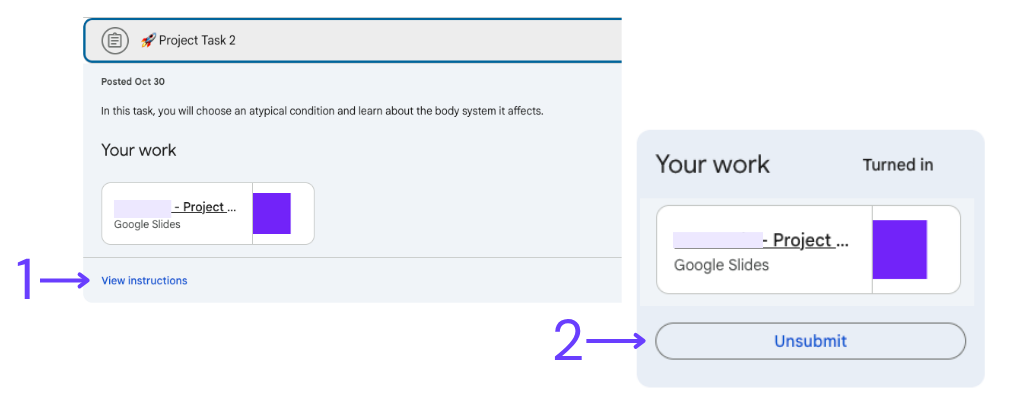
Quick fix: in the Classwork tab, open the assignment, click the blue View instructions link, then click Unsubmit. Editing and the comments come right back.
🔑 My learner can’t log into Google Classroom
You’re probably signed into a personal Gmail. Sign out of all Google accounts, then sign back in with your learner’s Prisma account and reopen Classroom.
If you get a message that the account has been deactivated, this can happen if has too many failed login attempts. Reach out to our Operations Team to get the password reset: operations@joinprisma.org
➗ Zearn won’t load
Refresh, try a different browser, and confirm your learner is logged into Zearn with their Prisma account. If one lesson is stuck, try another and note where it broke for the facilitator.
🔔 I’m not getting Classroom emails (or I’m getting way to many)
It’s a settings thing: in Google Classroom notification settings, dial them down if you’re flooded, or turn them on if you’re getting nothing. Also check spam. More on Set up my tools.
🏅 I forgot to submit badges for previous cycles
Better late than never. You can find previous badge submission forms below. Please send an email to robin@joinprisma.org after you’ve submitted so she can update your learner’s badge reports.